
How Digital Takeoff Software Improves Bid Accuracy
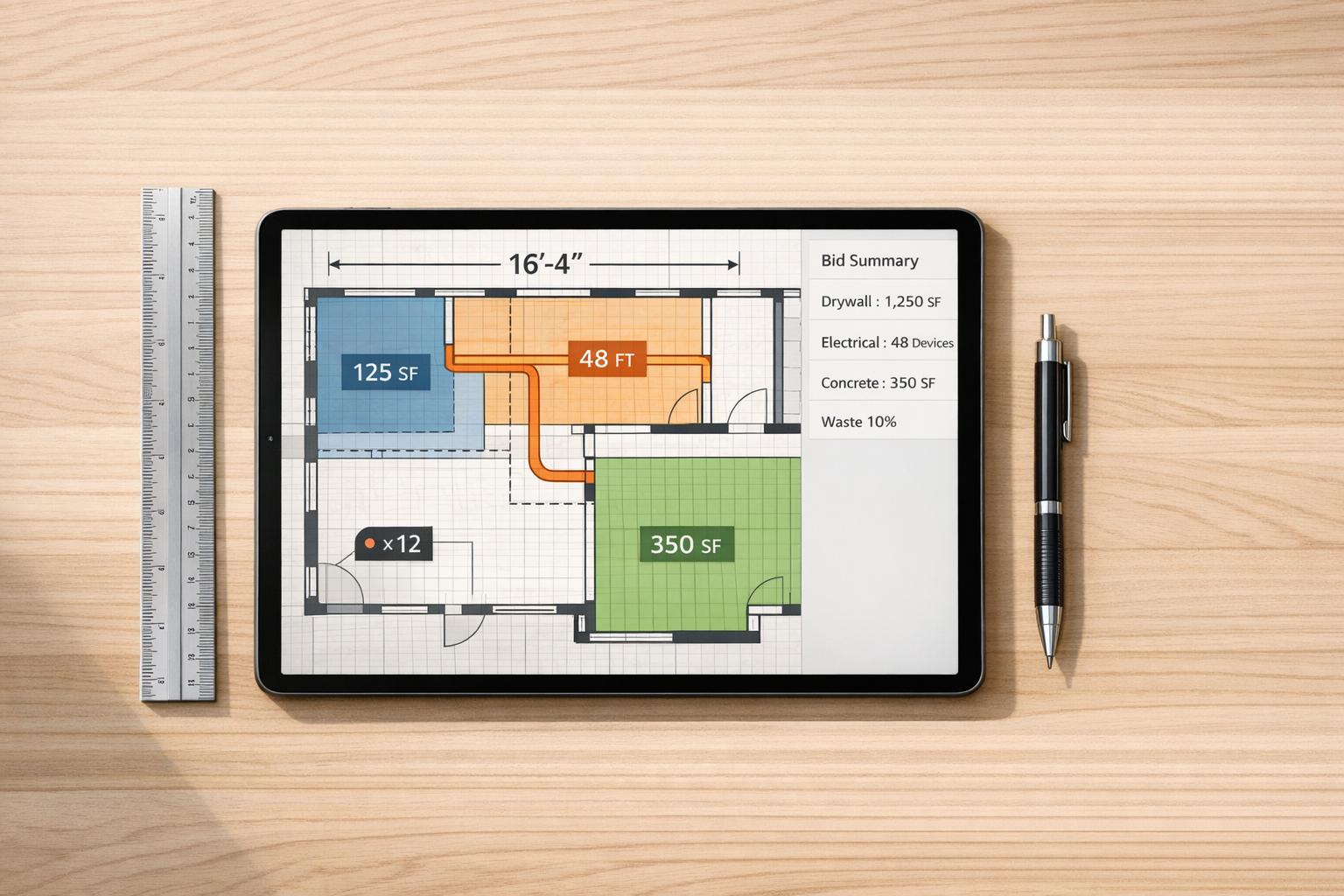
Small errors in construction bids can cost you big – sometimes hundreds of thousands of dollars. Digital takeoff software helps subcontractors avoid these mistakes by automating measurements, improving accuracy, and saving time. Here’s how it works:
- Accuracy Boost: Manual takeoffs are 85–90% accurate, while digital tools hit up to 98%. This prevents costly errors in material quantities and labor estimates.
- Time Savings: Digital tools reduce takeoff time by up to 70%. A task that takes days manually can be done in hours.
- Fewer Cost Overruns: Contractors using digital tools report 40% fewer budget overruns and 23% higher bid win rates.
- Automation: Pre-built trade libraries calculate materials and labor instantly, while updates to plans are handled effortlessly.
Common Problems with Manual Takeoffs
Calculation Errors and Measurement Inconsistencies
Manual takeoffs depend heavily on precise scale readings and accurate data entry. Using tools like physical scale rulers and highlighters on paper blueprints often leads to mistakes, such as misreading scales or missing changes in scale between pages. Transferring numbers from paper to spreadsheets adds another layer of potential error.
"Every decimal point matters. An estimate that’s even slightly off can erode your margins, cause project delays, and damage client trust." – STACK
Double-counting items or overlooking critical details is a frequent issue with manual methods. Even a small mistake, like a misplaced decimal point, can have a big impact – reducing profit margins or inflating costs unnecessarily. While manual methods typically achieve 85–90% accuracy, digital systems significantly outperform them, offering up to 98% accuracy.
Slow, Time-Consuming Workflows
Manual takeoffs demand a lot of time, putting subcontractors at a disadvantage in competitive markets. For example, a residential project that could be completed in 45–60 minutes using digital tools might take 3–4 hours manually. Similarly, mid-size commercial projects may require 1–2 days of manual effort instead of 2–4 hours, and large multi-story building takeoffs could take 3–5 days compared to just 5–8 hours with digital systems.
A contractor managing 100 projects a year could spend around 2,500 hours on manual takeoffs, compared to just 800 hours using digital tools – a difference of over 1,700 hours in lost productivity. Manual methods also struggle when plans are updated, often requiring estimators to start over or make extensive manual adjustments. In contrast, digital tools handle revisions instantly, saving time and reducing frustration.
Incorrect Material Quantities
Errors in estimating material quantities can lead to expensive problems. Overestimating materials results in uncompetitive bids, unnecessary storage costs, and on-site waste if the project is won. On the other hand, underestimating materials can cause project delays and force emergency purchases at higher prices.
"Ordering too much material can end up costing you extra money and creating storage issues. On the other hand, if you order too little, you’ll run into delays and unexpected expenses." – Buildxact
Manual takeoffs also make it difficult to apply consistent waste factors across various materials. This inconsistency hampers standardization in bidding and makes it harder to refine processes based on past projects. Digital tools, however, automate these calculations and allow for standardized waste factors, ultimately ensuring more competitive and accurate bids.
sbb-itb-4ee4ad4
How to Use On-Screen Takeoff for Quantity Takeoff | Full Beginner Tutorial
How Digital Takeoff Software Increases Bid Accuracy
Digital takeoff software tackles inefficiencies in manual processes, improving bid accuracy by automating crucial steps.
Automated Plan Measurements
Digital tools eliminate the guesswork of manual measurements. Instead of relying on physical scale rulers and manual calculations, you can calibrate the scale once by clicking on a labeled dimension in the PDF. From there, every measurement automatically reflects real-world dimensions.
This approach avoids the cascading errors common with paper-based methods. The software calculates totals across the entire plan in one step and can even count discrete items automatically, such as doors, windows, and light fixtures, ensuring nothing is overlooked.
Another key advantage is simultaneous measurements. For example, tracing a wall once allows the software to measure its length, calculate the wall area, and determine floor and ceiling coverage all at the same time. This ensures consistent material quantities. When plans are updated, color-coded overlays highlight changes, helping you spot revisions that could otherwise affect your bid.
Once accurate measurements are in place, trade libraries simplify material and labor estimation.
Pre-Built Trade Libraries
Pre-built trade libraries revolutionize how materials and labor are calculated. Instead of individually counting items like studs, plates, and fasteners, you simply measure linear feet of wall and apply a pre-built assembly. The software then generates a complete material list – everything from drywall sheets to fasteners.
"Measuring a wall can automatically generate the drywall sheets, framing lumber, fasteners, and labor required to build it." – Buildxact
These libraries also integrate labor rates, allowing you to calculate installation hours alongside the material list. This ensures no essential items, like anchors or hangers, are missed. For repetitive layouts – such as hotels or apartment buildings – you can perform the takeoff once and replicate the quantities across identical spaces.
Companies have seen impressive results with these tools. Executive Flooring, for instance, cut their takeoff time from 2 hours to just 5 minutes using custom libraries. Similarly, the TPH Group reduced their takeoff time by 40% and doubled their win rate. Senior Estimator Craig Nogas noted their wins jumped from $1 million annually to $2 million in a single quarter.
Live Updates and Team Access
Digital platforms provide a centralized dashboard showing the real-time status of every project – whether it’s in progress, submitted, awarded, or lost. Each estimator has their own login, ensuring clear accountability and allowing managers to monitor tasks. This setup supports a bid review workflow, where senior estimators can verify quantities and pricing before submission, catching potential errors.
Unlike shared Excel files prone to formula errors, digital platforms use structured databases that maintain calculation accuracy, even with multiple users working simultaneously.
"Our estimators turn around 3x as many bids per week now. The SOV export goes straight to the GC – no reformatting, no copying into Word. It looks professional every time." – Travis W., Roofing Sub
For firms managing multiple licensed entities, these platforms ensure the correct company profile, license number, and signatory are applied to each bid, avoiding disqualifications caused by administrative errors.
Consistent Waste Factors and Automatic SOVs
Digital tools ensure consistent waste factors are applied across all materials. Once you set the waste percentage for materials like concrete or drywall, the software applies it uniformly to every project. This consistency helps refine processes over time and eliminates discrepancies caused by varying assumptions among estimators.
Additionally, the software generates Schedules of Values (SOVs) directly from your takeoff data, removing the need for manual transcription. This eliminates formatting errors and produces professional proposals ready for submission.
Step-by-Step: Using Digital Takeoff Software for Better Bids
Here’s a straightforward process to turn digital measurements into detailed, accurate bids. Digital takeoff software makes it easier to convert PDF plans into professional estimates, helping subcontractors improve precision and efficiency.
Step 1: Upload and Mark Up PDF Plans
Start by uploading your files – PDF, DWG, or DXF formats work perfectly. Confirm you’re working with the latest drawing version, and calibrate the scale by using a known dimension, like a 10-foot wall. This step ensures pixel distances are converted into real-world measurements, avoiding common takeoff errors.
With these tools, you can measure areas, linear distances, counts, and volumes. Use polylines for irregular shapes or outline areas as needed. Some advanced software even leverages AI to detect symbols automatically, making it easier to count items like outlets or sprinkler heads. You can also use keyword searches to quickly find the pages most relevant to your trade.
Once you’ve marked up the plans and captured accurate measurements, you’re ready to move on to building your estimates.
Step 2: Apply Pre-Built Trade Assemblies
Next, connect your measurements to pre-built trade assemblies. For example, dimensions can be tied to specific materials like moisture-resistant or fire-rated drywall, which automatically generates estimates for both materials and labor. When you trace a wall, the software calculates everything you’ll need – drywall sheets, studs, fasteners, joint compound – and even estimates crew hours and labor rates.
"Measuring dimensions and tying them to specific materials happens in the same motion: square meter measurements get worked out for tasks like plastering, insulation, and painting, and contractor labor and overhead costs… get layered on top to build complete estimates." – Steve Griffin, Estimator, Just Building Group
For better clarity, break down your measurements by floor or room instead of measuring the entire building at once. And if you’re working on a roofing project, don’t forget to apply a slope or pitch factor to account for the roof’s actual surface area.
Step 3: Run and Review Calculations
With your assemblies in place, it’s time to run the calculations. The software will translate your measurements into trade-specific units – like cubic yards for concrete, drywall board counts, or tonnage for asphalt. You can also apply waste factors, typically 5% to 10% for drywall and 10% to 15% for trim carpentry.
Double-check the results against the floor plan to ensure accuracy. For example, if the software counts 15 doors but the plan shows 40 rooms, revisit the assembly scale. Be mindful of abbreviations like "TYP" (typical/multiply) or "NIC" (not in contract), as missing these can lead to miscounts. If you’re working with a team, use individual logins so senior estimators can review everything before finalizing.
Step 4: Create Professional Proposals
Finally, generate a polished proposal and Schedule of Values (SOV) with just one click. The software will automatically include your company’s profile, license information, and signatory details. Plus, it exports the SOV directly to the general contractor, eliminating errors caused by manual data entry or reformatting.
ScopeTakeoff Features for Better Bid Accuracy
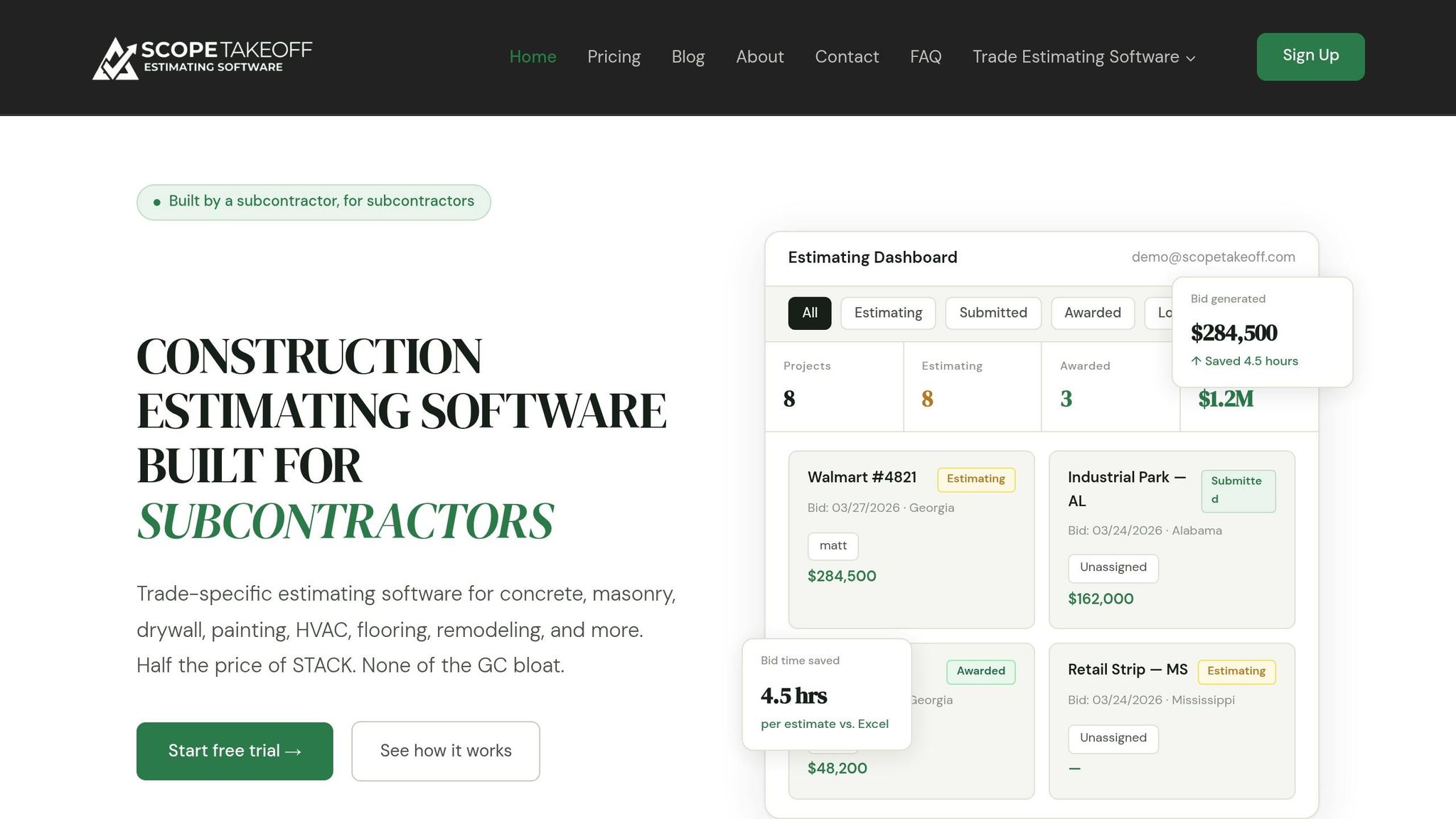
ScopeTakeoff takes the precision and speed of digital takeoffs to the next level with features tailored specifically for subcontractors. At $100 per person per month, the platform offers a straightforward, trade-focused estimating tool designed to simplify your workflow. Key features include pre-built assembly libraries for over 10 trades, PDF plan takeoffs, unlimited projects, and one-click SOV (Schedule of Values) generation. Plus, there’s no annual contract or setup fees to worry about.
Trade Libraries and Auto Calculations
ScopeTakeoff provides pre-built assembly libraries for trades like concrete, masonry, drywall, painting, HVAC, flooring, remodeling, landscaping, roofing, and asphalt. Simply input the dimensions once, and the system generates a fully priced estimate, complete with labor and material breakdowns. For instance, in masonry, the tool calculates block counts, mortar, and grout based on wall dimensions – saving you from manual counting.
"The masonry assembly library alone is worth it. I used to count every block by hand off the plans. Now I enter the dimensions and it provides complete quantities and materials lists."
– Mike C., Masonry Contractor
The platform automates calculations specific to each trade. Whether it’s cubic yards for concrete, drywall board counts (accounting for openings), tonnage for asphalt, or slope factors for roofing, ScopeTakeoff handles it all. This automation eliminates the risk of errors from broken Excel formulas and ensures consistent, accurate pricing across bids. Subcontractors typically save an average of 4.5 hours per estimate compared to using spreadsheets.
Unlimited Projects and Multi-Entity Management
With ScopeTakeoff, there’s no limit on the number of projects or estimates you can manage – no hidden fees or caps. If you operate under multiple licensed entities, like one for residential and another for commercial work, the platform’s multi-entity profiles let you set up separate company details. This feature ensures the correct license number, business address, and signatory information are automatically included in each proposal, reducing the risk of submitting bids with incorrect legal information. These tools simplify project management and make the bid review process more efficient and accurate.
Team Tools and Bid Review Process
Every estimator gets their own login, making it easy to track individual progress and balance workloads. The centralized dashboard offers a clear snapshot of bids in progress, submitted, or won. Meanwhile, the built-in bid review workflow allows senior estimators or project managers to verify quantities, margins, and pricing before finalizing proposals. This structured process not only improves accuracy but also speeds up bid turnaround times, helping you stay competitive.
Manual vs. Digital Takeoffs: The Numbers
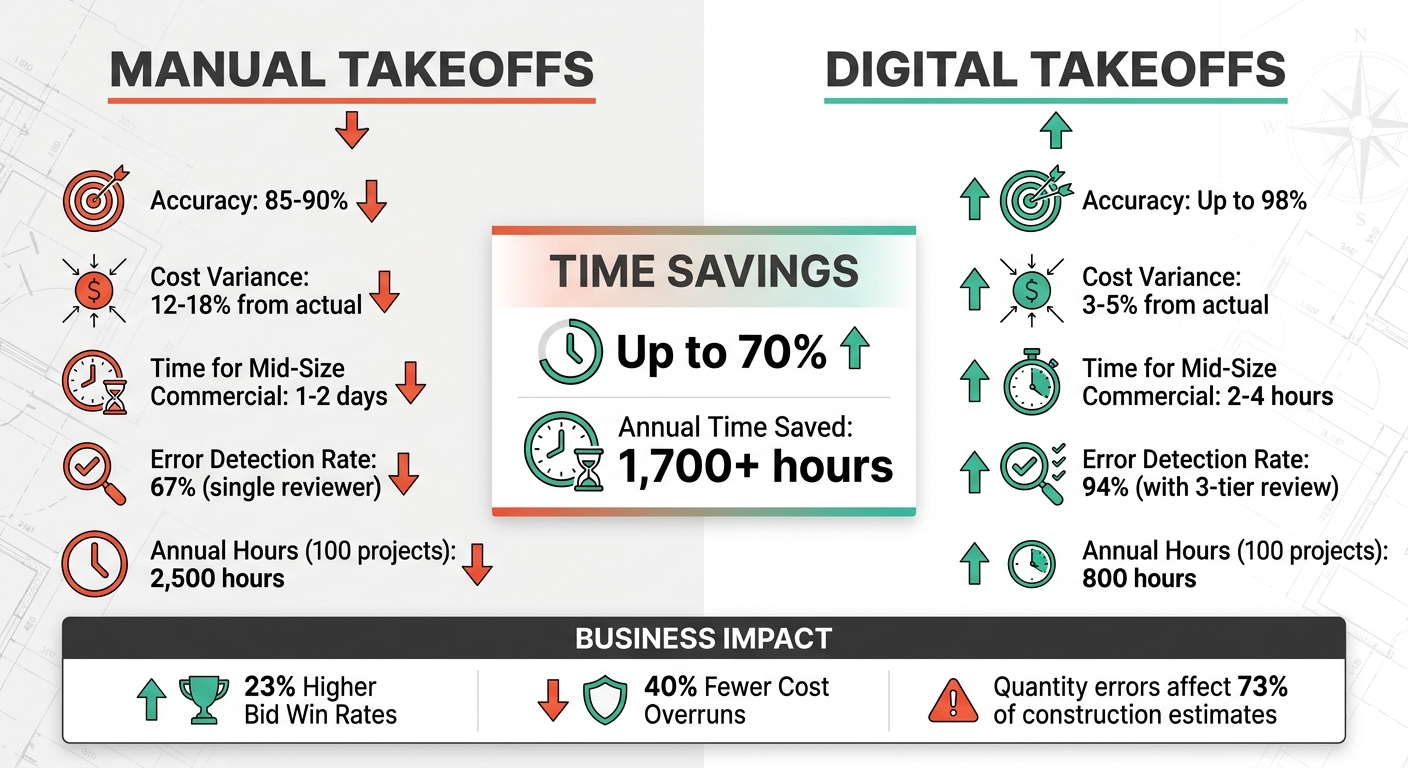
Manual vs Digital Takeoff Software: Time Savings and Accuracy Comparison
Time and Error Rate Comparison
When comparing manual and digital takeoffs, the numbers speak for themselves. Manual methods typically achieve 85–90% accuracy, while digital tools push that figure to up to 98%. This difference is critical because errors in quantity takeoffs impact 73% of all construction estimates.
In terms of cost variance, the industry average for construction estimates deviates 12–18% from actual costs. Digital tools, especially those powered by AI, bring this down to just 3–5%. As David Martinez, CB, explains:
"Quantity errors are the most damaging because they cascade through the entire estimate. Wrong quantities multiplied by correct unit costs produce wrong totals".
Here’s a quick breakdown:
| Metric | Manual Takeoffs | Digital Takeoffs |
|---|---|---|
| Average Accuracy | 85–90% | Up to 98% |
| Cost Variance | 12–18% from actual | 3–5% from actual |
| Time for Mid-Size Commercial | 1–2 days | 2–4 hours |
| Error Detection Rate | 67% (single reviewer) | 94% (with 3-tier review) |
Digital tools can save up to 70% of the time spent on takeoffs. For instance, a contractor who spends 25 hours per project using manual methods could reduce that to 8 hours with digital tools. Over 100 projects, that translates to saving over 1,700 hours annually. These time and accuracy gains highlight why digital takeoffs are a game-changer.
How Better Bids Drive Business Growth
Beyond saving time, improved accuracy fuels business growth. Contractors leveraging AI-driven software and structured reviews report 23% higher bid win rates and 40% fewer cost overruns. In competitive public bidding, where winning bids often fall within 2–3% of each other, a 5% estimating error can mean the difference between securing profitable work or losing out entirely. Lower error rates not only enable more competitive pricing but also safeguard profit margins.
The financial stakes are high. For example, a 10% quantity error on a $500,000 concrete scope results in a $50,000 variance – and that’s before factoring in pricing. On average, quantity takeoff errors add 8–15% to project costs. Eliminating these mistakes allows contractors to bid more confidently, submit more bids in less time, and ultimately win more work while protecting their bottom line.
Conclusion
This guide has shown how automated measurements and trade-specific assemblies can tackle common estimating errors head-on. Accurate bids are crucial for maintaining profitability, yet manual takeoffs often lead to scale errors, overlooked items, and miscalculations – issues that can quickly turn a profitable bid into a costly mistake. Digital takeoff software addresses these challenges by automating measurements, integrating trade-specific assemblies, and identifying errors before they ripple through the entire estimate.
Consider this: reducing cost variance from 12–18% down to 3–5% helps safeguard your profit margins. With quantity takeoff mistakes affecting 73% of construction estimates, tools that automate calculations and provide visual confirmation aren’t just helpful – they’re game-changers. Digital estimating has been linked to 40% fewer cost overruns and a 23% increase in bid win rates, directly boosting profitability.
Speed is another critical factor in staying competitive. Halving the time it takes to prepare a bid – or being able to complete three times as many bids in a week – means you can chase more opportunities without compromising quality. Tools like ScopeTakeoff offer this efficiency for just $100 per person per month, while also providing features such as trade libraries for over 10 specialties, PDF plan takeoff, automated calculations, and one-click SOV exports.
Accurate and efficient estimating is a key driver of business growth. When you can produce faster, more precise bids with polished documentation, you win more projects and protect your bottom line. Digital takeoff software turns estimating into a strategic advantage, enabling subcontractors to consistently deliver professional, accurate bids that fuel long-term success.
FAQs
How do I choose the right takeoff software for my trade?
When picking takeoff software, it’s crucial to focus on features tailored to your trade. Look for tools that offer pre-built libraries, automatic calculations, and straightforward bid management. These can save you a ton of time and reduce errors.
Make sure the software supports your specific trade – whether it’s drywall, roofing, HVAC, or something else entirely. It should also allow you to import PDF plans and export polished proposals easily. Compatibility with your devices is another key factor. Plus, having the ability to save assemblies and pricing history can make future bids more efficient.
Ultimately, the best software will align with your workflow while helping you create more accurate bids.
What’s the best way to QA/QC a digital takeoff before submitting a bid?
To ensure accuracy in a digital takeoff, follow a structured review process designed to minimize errors. A three-step review system works well:
- Self-check: Start by thoroughly reviewing your own work to catch obvious mistakes.
- Peer review: Have a colleague double-check your takeoff for potential oversights.
- Management review: Finally, let a manager or senior team member conduct a final review for quality assurance.
For added precision, incorporate AI-powered tools. These can help identify inconsistencies and compare your takeoff data against historical project costs. This combination of human oversight and technology reduces errors and ensures your bid is as accurate as possible.
How should I set waste factors so bids stay accurate and competitive?
To ensure bids remain precise and competitive, it’s important to determine waste factors by examining historical data and aligning with industry standards for various materials and trades. Tools like ScopeTakeoff make this process easier by offering trade-specific libraries and pre-built assemblies that allow for accurate adjustments. Additionally, take into account the unique conditions of each project and follow industry guidelines to set realistic waste percentages. This approach helps cover material overages without unnecessarily driving up costs.