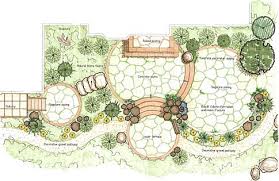
Landscaping estimating software should allow contractors to calculate material and labor costs, build accurate bids, and send professional proposals faster.
The best tools are not just generic estimating platforms. They should support landscape-specific work like planting beds, sod, mulch, irrigation, hardscaping, grading, pavers, retaining walls, and maintenance scopes.
Below are the top landscape estimating software features to look for if you want faster takeoffs, cleaner proposals, and more consistent bids.
Key Features to Look For
- PDF Plan Takeoff: Measure areas, lengths, counts, and quantities directly from digital plans.
- Pre-Built Assembly Libraries: Turn measurements into material, labor, equipment, and waste estimates.
- Automatic Landscape Calculations: Reduce manual math errors for mulch, sod, pavers, irrigation, grading, and more.
- SOV and Proposal Output: Generate polished, professional bid documents faster.
- Multi-Entity Profiles: Use the correct license, business information, and signatory on each proposal.
- Team Estimating Tools: Let multiple estimators work from one shared system.
- Unlimited Projects and Estimates: Handle more bid opportunities without project limits.
- Client-Facing Proposal Export: Send branded proposals that clearly show scope and pricing.
- Bid Review Workflow: Catch missed items, margin issues, and inconsistent assumptions before submission.
- All-in-One Estimating Platform: Keep takeoff, estimating, review, and proposal output in one place.
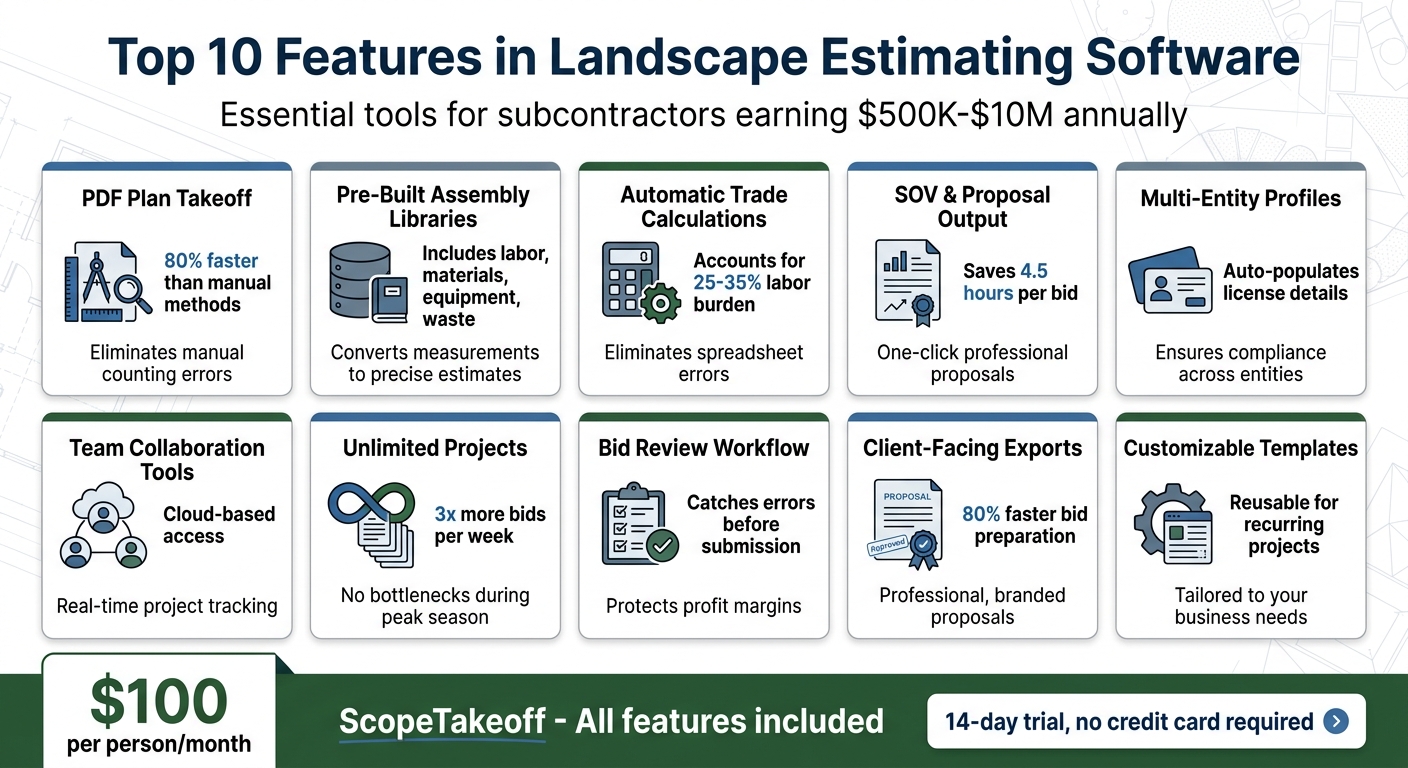
Top 10 Landscape Estimating Software Features Comparison
1. PDF Plan Takeoff
PDF plan takeoff is one of the most important features in landscape estimating software. Instead of printing plans, measuring by hand, or manually counting items, contractors can upload digital plan sheets and measure directly from the drawing.
For landscape contractors, this can include:
- Planting bed square footage
- Sod areas
- Mulch zones
- Irrigation heads
- Paver areas
- Retaining wall lengths
- Edging lengths
- Grading areas
- Tree and shrub counts
- Outdoor lighting locations
Digital takeoff helps reduce common mistakes like missed areas, double-counting, scale errors, and retyping measurements into a separate spreadsheet.
Good PDF takeoff tools should let you measure areas, lengths, counts, arcs, and irregular shapes. This is especially useful for curved beds, walkways, patios, and irrigation layouts where simple square or rectangular measurements are not enough.
2. Pre-Built Assembly Libraries
Pre-built assembly libraries help turn measurements into full estimates. Instead of measuring an area and then manually figuring out every material, labor item, and cost, an assembly can calculate the full scope for you.
For example:
- A sod assembly might include sod, soil prep, starter fertilizer, labor, waste, and equipment.
- A mulch assembly might include mulch quantity, bed prep, edging, labor, and cleanup.
- A paver assembly might include base material, sand, pavers, cuts, compaction, waste, and labor.
- An irrigation assembly might include pipe, heads, valves, fittings, controller, trenching, and labor.
- A planting assembly might include plants, soil amendments, mulch, staking, fertilizer, and labor.
This helps contractors avoid missed items and keeps estimates consistent from one bid to the next.
3. Automatic Landscape Calculations
Landscape estimates involve a lot of conversions. Manual spreadsheets can work, but they are easy to break, copy incorrectly, or update inconsistently.
Automatic landscape calculations help convert measurements into usable quantities, including:
- Square feet of sod
- Cubic yards of mulch
- Cubic yards of soil
- Tons of stone or base material
- Linear feet of edging
- Paver quantities
- Concrete quantities for flatwork
- Irrigation head counts
- Pipe lengths
- Labor hours
- Waste factors
These calculations help reduce manual math errors and make the estimating process more repeatable.
4. SOV and Proposal Output
A good estimate is only useful if it can be turned into a clear proposal.
Landscape estimating software should help contractors generate polished proposals and Schedule of Values documents without manually copying numbers into Word, Excel, or another system.
- Present scope clearly
- Show line items professionally
- Reduce copy/paste errors
- Create branded bid documents
- Export SOVs for general contractors
- Keep estimate numbers aligned with the final proposal
5. Multi-Entity Profiles
Some landscape contractors operate under multiple licenses, business names, branches, or related entities.
Multi-entity profiles help make sure the correct business information appears on each proposal, including company name, license number, business address, contact information, signer, logo, and state-specific details.
Without this, teams may have to manually edit every proposal, which creates room for mistakes.
6. Team Estimating Tools
As a landscape contractor grows, estimating often becomes a team process.
Useful team features include:
- Individual estimator logins
- Manager review
- User permissions
- Shared project access
- Bid status tracking
- Centralized dashboards
- View-only access for certain users
- Project notes and audit trails
This helps keep everyone aligned while protecting sensitive pricing data.
7. Unlimited Projects and Estimates
Landscape contractors often bid many jobs before winning one. If your software limits projects or charges heavily based on project volume, it can slow down the estimating process.
Unlimited projects and estimates help contractors track more opportunities without worrying about software caps.
Unlimited project storage also helps build a pricing history. Past projects can become useful references for future bids, especially when estimating similar scopes like sod installation, irrigation work, mulch refreshes, hardscapes, or commercial maintenance packages.
8. Client-Facing Proposal Export
Client-facing proposal export is different from just generating an internal estimate.
A client-facing proposal should be clean, branded, and easy to understand. It should help the customer or GC see exactly what is included, what is excluded, and what the final price covers.
- Company logo
- Business information
- License details
- Scope breakdown
- Line items
- Alternates
- Exclusions
- Terms
- Images or visual references
- Signer information
- PDF export
9. Bid Review Workflow
Bid review workflows help catch mistakes before proposals are sent.
A good bid review workflow can help catch:
- Missed scope
- Wrong quantities
- Incorrect labor assumptions
- Missing waste factors
- Outdated pricing
- Low margins
- Inconsistent production rates
- Proposal formatting issues
- Missing exclusions
- Unreviewed alternates
For growing teams, this creates a simple approval process. Estimators can build the bid, and a manager or owner can review it before submission.
Accuracy in Estimating
ScopeTakeoff is designed with subcontractors in mind, particularly those in landscaping and nine other trades. It comes equipped with pre-built assembly libraries that cover essential areas like planting, hardscaping, irrigation, lawn care, grading, and maintenance. By entering quantities just once, users can instantly generate detailed, priced estimates that break down labor and material costs. This eliminates the risk of errors often associated with manual spreadsheets.
One standout feature is its PDF plan takeoff tool. Users can upload plan sheets, measure quantities directly from the drawings, and seamlessly transfer those measurements into their estimates – no need for tedious retyping or manual counting. For landscape subcontractors managing revenues between $500,000 and $10 million, this level of accuracy is a game-changer. A single pricing mistake on a $500,000 project could erase months of profit. This precision ensures smoother workflows and error-free bid reviews.
Streamlining Workflow
ScopeTakeoff goes beyond just accurate calculations; it simplifies the entire bidding process with integrated workflow tools. Its bid review workflow offers team leads a centralized dashboard to track bids – whether they’re in progress, submitted, or won. This setup allows managers to identify potential margin errors or missed items before bids are sent out. Meanwhile, each estimator operates securely within their own login, keeping data organized and accessible.
Customization Options
For subcontractors managing multiple licenses, the platform’s multi-entity profiles feature is a huge time-saver. It automatically populates proposals with the correct license numbers, addresses, and signatories, ensuring documents are both legally compliant and professionally formatted.
At $100 per person per month, ScopeTakeoff includes access to all 10+ trade assembly libraries, unlimited projects, and even offers a 14-day trial with no credit card required. These features make it a practical and efficient solution for subcontractors, helping them refine their bid process and protect their profit margins.
sbb-itb-4ee4ad4
2. PDF Plan Takeoff
Precision in Estimating
Uploading PDFs and using digital tools for measurements eliminates the guesswork of manual counts. Instead of eyeballing curved garden beds or winding pathways, tools like the Arc tool let you trace shapes precisely, giving you exact measurements. For scattered items such as irrigation heads, plants, or outdoor furniture, automated symbol counting scans the plan and quantifies every element with precision.
What’s more, these measurements feed directly into your Bill of Quantities, cutting out the need for retyping and reducing transcription errors. This approach doesn’t just save time – it’s up to 80% faster than traditional methods like paper and pencil, enabling you to handle more bids without compromising on accuracy.
This level of precision not only sharpens your estimates but also creates a solid base for smoother workflows.
Simplifying Workflow
Accurate measurements are just the beginning. PDF plan takeoff tools streamline bid preparation by keeping everything in one place. From plan sheets to markups and estimates, all your data is stored in a cloud-based system, accessible from the office, home, or even the job site. This eliminates the hassle of managing multiple versions of a plan. Need to check for changes? Overlay features allow you to visually compare revisions, helping you spot updates or new requirements before finalizing your bid. These efficiencies can save subcontractors an average of 4.5 hours per bid compared to using Excel.
Tailored Features
PDF takeoff tools are flexible enough to handle the unique needs of landscape projects. For example, if you need to exclude a pool or fountain from your total turf area calculation, cutout tools make it easy to remove these sections from your measurements. You can also organize takeoffs into custom layers, separating mowing zones from bed maintenance areas or irrigation sections for better clarity.
3. Pre-Built Assembly Libraries
Accuracy in Estimating
Pre-built assembly libraries take the guesswork out of calculations by automatically converting measurements into precise material and labor estimates. For example, if you’re measuring a planting bed or hardscape area, the software instantly translates those dimensions into the exact quantities of materials and labor required.
These assemblies include everything – labor, materials, equipment, and even waste – in your bid. For instance, a $28/hour employee actually costs between $37.80 and $39.20/hour when you factor in taxes, workers’ compensation, and benefits. Without automated calculations, these additional labor costs can easily be overlooked, cutting into your profit margins. By ensuring nothing is missed, this level of precision helps protect your bottom line while complementing the automation offered by PDF takeoff tools.
“The masonry assembly library alone is worth it. I used to count every block by hand off the plans. Now I enter the dimensions and it spits out quantities, mortar, everything.” – Mike C., Masonry Contractor
Streamlining Workflow
Assembly libraries take accurate digital measurements and turn them into complete, ready-to-use bids. Once you input the measurements, the software generates a fully priced estimate, automatically breaking down labor and material costs. This process ensures your team works with consistent production rates and assumptions, eliminating the pricing inconsistencies that often arise when estimators rely on intuition. This consistency becomes especially valuable during busy bidding seasons, helping you maintain steady margins.
Contractors using landscape estimating software with pre-built assemblies can create bids much faster than those relying on spreadsheets. This speed allows you to handle more bids without needing to expand your team or compromise on accuracy.
Customization Options
Pre-built libraries provide a strong starting point, but they also allow for customization. You can adjust production rates based on your crew’s specific performance data. Additionally, you can create custom templates for recurring projects – like residential lawns, commercial irrigation, or hardscape installations – saving time on future bids. The software even lets you include images of plants, pavers, or lighting fixtures within your assemblies, making your proposals more visually appealing and client-friendly. These customization options enhance efficiency and ensure your estimates are tailored to your business needs while remaining precise and professional.
4. Automatic Trade Calculations
Accuracy in Estimating
Automatic trade calculation tools eliminate the risk of broken formulas and manual errors often found in spreadsheet-based estimating. These systems handle landscaping-specific conversions seamlessly – whether it’s cubic yards for soil and mulch, tonnage for asphalt, concrete estimating software for flatwork, or square footage into rolls of sod or linear feet of edging. The software works behind the scenes, turning plan measurements into accurate material quantities.
Beyond material calculations, these tools account for additional costs like labor burden, travel time, and equipment depreciation, helping safeguard your profit margins. Labor burden – which includes workers’ compensation, payroll taxes, and benefits – typically adds 25–35% to base wages. For instance, a $24-per-hour wage can increase to $30–32 per hour when labor burden is factored in. Many landscaping contractors overlook these expenses, leading to underestimations of job costs by a similar 25–35% margin.
“Every estimate without labor burden, travel, and overhead is a guess. [Software] turns it into math.” – GreenMargins Team
By capturing all these details, the software ensures your estimates are precise and ready for faster, more integrated bid preparation.
Streamlining Workflow
Digital takeoffs combined with automatic estimating tools can speed up the process by as much as 80% compared to manual methods. These tools transform plan measurements into comprehensive cost breakdowns, detailing labor hours, material quantities, and real-time profit margins – all before you send the quote. For example, a 3-person crew’s travel time can cost $85–95 per site visit in unbillable wages and fuel. The system calculates these logistics costs based on crew size and distance, ensuring no detail is overlooked.
Standardized rates further enhance consistency across your team. Instead of relying on individual estimators’ assumptions, the software applies company-wide performance data. This ensures every bid – whether for a residential lawn installation or a commercial irrigation project – is built on the same reliable metrics. Contractors using automated systems can generate bids up to five times faster than those relying on traditional methods. By standardizing processes and capturing all associated costs, these tools not only improve the speed of bid generation but also align seamlessly with your overall workflow.
5. SOV and Proposal Output
Accuracy in Estimating
A Schedule of Values (SOV) plays a crucial role in ensuring your internal cost calculations align perfectly with your final bid. By accurately entering details like materials, labor, and overhead, the SOV becomes a reliable reflection of your bid. Automated systems simplify this process by transferring key cost details – such as labor burden, travel time, and equipment expenses – directly into the SOV. This eliminates the costly errors that often arise with manual spreadsheet estimates. Even a single mistake in the SOV can put months of profit at risk.
Streamlining Workflow
Efficiency is just as important as accuracy when it comes to the bidding process. Automated tools that offer one-click SOV generation eliminate the hassle of manually copying data into Word or Excel. Roofing subcontractor Travis W. shared his experience:
“Our estimators turn around 3x as many bids per week now. The SOV export goes straight to the GC. It looks professional every time.”
On average, automated estimating and proposal tools save 4.5 hours per estimate compared to manual methods. By allowing estimate data to flow directly into a formatted proposal, these tools reduce transcription errors that could cost thousands of dollars. This means your team can spend less time on administrative tasks and more time focusing on securing new work.
Customization Options
Proposal output tools also provide customization features that enhance your professional image. These tools allow you to create branded documents complete with your logo and custom formatting. Visual aids, such as map-based images, can clearly define service areas – like which bed edges will receive mulch or which turf sections will be maintained – minimizing scope disputes and ensuring all work is compensated. Brandon Ingram, President of Environment Control Solutions, highlighted the value of this feature:
“It has given us the ability to justify our pricing which makes us look more professional than our competition and helps us win more business”.
Additionally, multi-entity profiles ensure proposals include the correct license details, improving compliance and reinforcing a polished presentation. During negotiations, these tools allow you to adjust pricing by showing clients how removing specific services – such as weekly detailing or chemical applications – affects the overall cost, all while maintaining your gross margin.
6. Multi-Entity Profiles
Accuracy in Estimating
With multi-entity profiles, proposals are automatically populated with the correct license details, addresses, and signatories, reducing the risk of compliance errors. For landscaping businesses that operate under multiple specialized licenses, this automation is a game-changer. It eliminates the chance of clerical mistakes when switching between company details. Imagine submitting a bid with the wrong license number – this small error could disqualify the proposal or even lead to compliance issues, which no business can afford.
Streamlining Workflow
Managing multiple branches or entities is much simpler with a centralized dashboard. This system automatically handles contacts and legal credentials, saving time and reducing the chance of manual errors. It’s especially helpful for contractors generating $500,000 to $10 million annually who juggle different licenses or business names across regions or trades. By centralizing these details, contractors get a clear, unified view of all their projects, making operations smoother and more efficient.
Customization Options
Each profile can be tailored with its own branding and state-specific credentials, ensuring proposals are both professional and compliant. For example, storing state-specific license numbers ensures that bids align with local regulations. Additionally, you can assign unique signatories to different branches or divisions, so the correct manager’s name and contact details appear on every proposal – no manual edits needed. These features integrate seamlessly with the automated calculations and measurements discussed earlier, making bid preparation faster and more reliable.
7. Team Estimating Tools
Collaboration Features
Cloud-based platforms make teamwork on landscape bids much easier. When multiple estimators are involved, these tools allow everyone to access the same project at the same time. For example, one team member can focus on measuring hardscape areas while another handles counting plant symbols, speeding up the entire estimating process. With individual logins, managers can monitor the progress of bids in real time. Permission controls add another layer of security, letting senior estimators make edits while field crews or partners can only view proposals without affecting pricing data. This shared access ensures consistency and accuracy across the board.
Accuracy in Estimating
Standardized production rate libraries are a game-changer for keeping estimates realistic. They align labor hours and material costs across all users, reducing the risk of overly optimistic projections. As SiteRecon points out:
“One estimator’s optimism can leave the field crew scrambling to hit unrealistic goals”.
Additionally, built-in workflows for bid reviews require managerial approval before proposals are sent out. This extra step helps catch errors like missed line items or incorrect margins. By enforcing these standardized processes, the tools ensure estimates remain both efficient and precise.
Streamlining Workflow
Centralized dashboards simplify project management by keeping everything in one place. Instead of digging through emails or shared drives, all project files – like PDFs, measurements, and cost breakdowns – are easily accessible from any device. This streamlined approach enables landscape contractors managing annual revenues of $500,000 to $10 million to handle more bids without needing to expand their estimating teams. The result? More opportunities and greater efficiency.
Customization Options
The best team tools go beyond collaboration – they adapt to fit your workflow. Flexible permission settings keep sensitive pricing details secure for view-only users, while lead estimators can tweak costs as needed. These features ensure every proposal is accurate, polished, and ready to impress clients.
8. Unlimited Projects and Estimates
Streamlining Workflow
When bid volumes spike, manual methods like Excel spreadsheets and paper-based takeoffs quickly become a bottleneck. These outdated processes simply can’t keep up with the demands of scaling operations, especially during peak bidding seasons when every second counts. With unlimited capacity, modern estimating software allows contractors to go after every bid opportunity without hesitation.
The stats are eye-opening: estimators using specialized software can handle three times as many bids per week compared to those relying on manual methods. For businesses generating annual revenues between $500,000 and $10 million, this boost in efficiency can significantly expand the sales pipeline. Plus, by storing every project’s pricing history, the software provides a solid foundation for future bids, ensuring both scalability and precision.
Accuracy in Estimating
Handling more bids doesn’t mean sacrificing accuracy. Unlimited project storage helps estimators build a comprehensive pricing history, eliminating the need to start from scratch each time. Features like saved assemblies and historical data ensure consistency across projects, which protects profit margins even as bid volumes grow. The time saved adds up quickly, allowing teams to focus on fine-tuning bids rather than fixing errors or re-entering data. On top of that, centralized data improves team collaboration, keeping everyone on the same page.
Collaboration Features
With unlimited estimates stored in a centralized system, project management becomes much more efficient. Cloud-based dashboards offer real-time updates, making it easy to track project statuses and maintain a clear view of the sales pipeline. ScopeTakeoff’s software supports this level of organization and growth for just $100 per person/month. This makes enterprise-level tools accessible to growing landscape contractors, enabling them to expand without losing track of the details.
9. Client-Facing Proposal Export
Streamlining Workflow
Manually transferring and reformatting bid data can be a major time drain. With one-click proposal exports, data is pulled directly from your takeoff, creating a polished proposal in just seconds. This automation not only speeds up the process but also ensures your data remains accurate.
In fact, best construction estimating software options can cut bid preparation significantly. For landscape contractors, this means more time to chase additional opportunities during busy seasons.
Accuracy in Estimating
Manual data entry often leads to errors – like incorrect square footage or misplaced decimals. By syncing data directly, you ensure that proposal numbers align perfectly with your internal calculations. Plus, map-based proposals add another layer of precision by using color-coded zones to define service areas for turf, beds, and hardscapes. This feature helps avoid disputes over scope and unexpected extra work.
Customization Options
A well-designed proposal doesn’t just inform – it impresses. Modern tools include features like automatically adding your company logo, license numbers, and business address, along with designated signatories. You can also personalize your proposals with high-quality images of plants, pavers, or lighting fixtures, helping clients better visualize the project. ScopeTakeoff offers these customization options for $100 per person/month.
10. Bid Review Workflow
The bid review workflow ties together automated data accuracy and team collaboration to finalize the estimation process and ensure the quality of bids before they reach clients.
Accuracy in Estimating
Even a single missed line item on a $500,000 project can wipe out months of profit. This is where bid review workflows come into play, acting as a safety net to catch margin errors and other mistakes before proposals are submitted. By implementing a manager review process, errors are identified and corrected early, ensuring clients receive accurate proposals.
Another key aspect is maintaining consistency in production rates. If each estimator uses their own assumptions, bid totals can vary significantly. Standardized production rate libraries solve this issue, ensuring estimates align with historical data and reflect actual costs.
Collaboration Features
Trade estimating software for teams revolutionize how landscape contractors handle large, complex bids. With individual user logins, managers can track who is working on specific estimates and set access levels. Some team members may have full editing privileges, while others are limited to view-only access. ScopeTakeoff’s centralized dashboard provides a clear overview of bids – whether in progress, submitted, or won – making sure no proposal is overlooked.
“Give each estimator their own login. Review bids before they go out. See what’s in progress, submitted, and won – all in one dashboard.” – ScopeTakeoff
This collaborative setup keeps the entire team aligned and eliminates bottlenecks. Additionally, an audit trail logs every change made from the initial takeoff to the final proposal. This feature simplifies the review process, ensuring accuracy and consistency before submission. By incorporating these final checks, ScopeTakeoff reinforces a smooth and error-resistant workflow from start to finish.
Conclusion
Finding the right landscape estimating software means choosing a tool that can automate data entry, standardize pricing, and produce polished proposals that satisfy both general contractors and clients. The features discussed – like PDF plan takeoff, pre-built assembly libraries, SOV creation, and bid review workflows – are all designed to minimize mistakes, speed up processes, and protect your bottom line.
For subcontractors earning between $500,000 and $10 million annually, simplicity and affordability are key. What truly matters is trade-specific functionality tailored to landscaping, automated quantity calculations, and collaborative tools that keep your team on track during busy bidding periods. ScopeTakeoff embodies these priorities, offering a streamlined solution.
ScopeTakeoff caters to subcontractors across 10+ trades, priced at $100 per person monthly with no long-term commitment. It combines critical features – PDF takeoff, pre-built assemblies, automated quantity calculations, SOV exporting, multi-entity profiles, and team collaboration tools – into a single platform. This eliminates the headaches of manual input, inconsistent pricing, and unpolished proposals.
Before making a decision, ensure the software integrates accurate measurement tools, supports teamwork, and delivers professional-grade proposals. The right software should simplify and accelerate your estimating process, not complicate it further.
FAQs
How do I know if PDF takeoff will be accurate on my plan sets?
The accuracy of PDF takeoffs hinges on how well the software can deliver precise measurements tied to your plans. To achieve reliable results, it’s crucial that your plan sets are clear and carefully drafted. Without this clarity, even the best tools may struggle to provide dependable measurements.
Investing in high-quality software tailored for landscape estimating can make a big difference. These tools not only simplify the measurement process but also help ensure greater precision, saving you time and reducing errors.
What should I customize first in assembly libraries and production rates?
To get started, tailor your assembly libraries and production rates to align with the demands of your usual projects. Incorporate trade-specific, pre-built assemblies and ensure unit costs are as accurate as possible. This approach not only enhances the precision of your estimates but also minimizes manual mistakes and saves valuable time, leading to more reliable bids.
How do bid review workflows prevent missed items and margin errors?
Bid review workflows streamline the estimating process by automating measurements and ensuring consistency. This reduces manual calculation errors, improves the accuracy of bids, and helps avoid costly oversights or missed items.