
Change Order Process: Steps for Subcontractors

Don’t lose money on change orders. A structured process ensures you get paid for extra work, protects your legal rights, and avoids costly disputes. Here’s how:
- Spot changes early: Train your crew to identify changes like scope adjustments, design conflicts, or unexpected site conditions.
- Document everything: Record details immediately – include costs, schedule impacts, and timestamped evidence.
- Submit a clear request: Provide a detailed breakdown of costs, timelines, and supporting documents. Use tools like trade estimating software to avoid errors.
- Get written approval: Never start work without a signed change order to protect your payment.
- Track progress: Monitor costs and keep updated logs to ensure proper billing.
Following these steps can help recover up to 73% more revenue and reduce disputes by 60%. Always prioritize written agreements over verbal ones. For more industry best practices, check out our construction estimating guides.
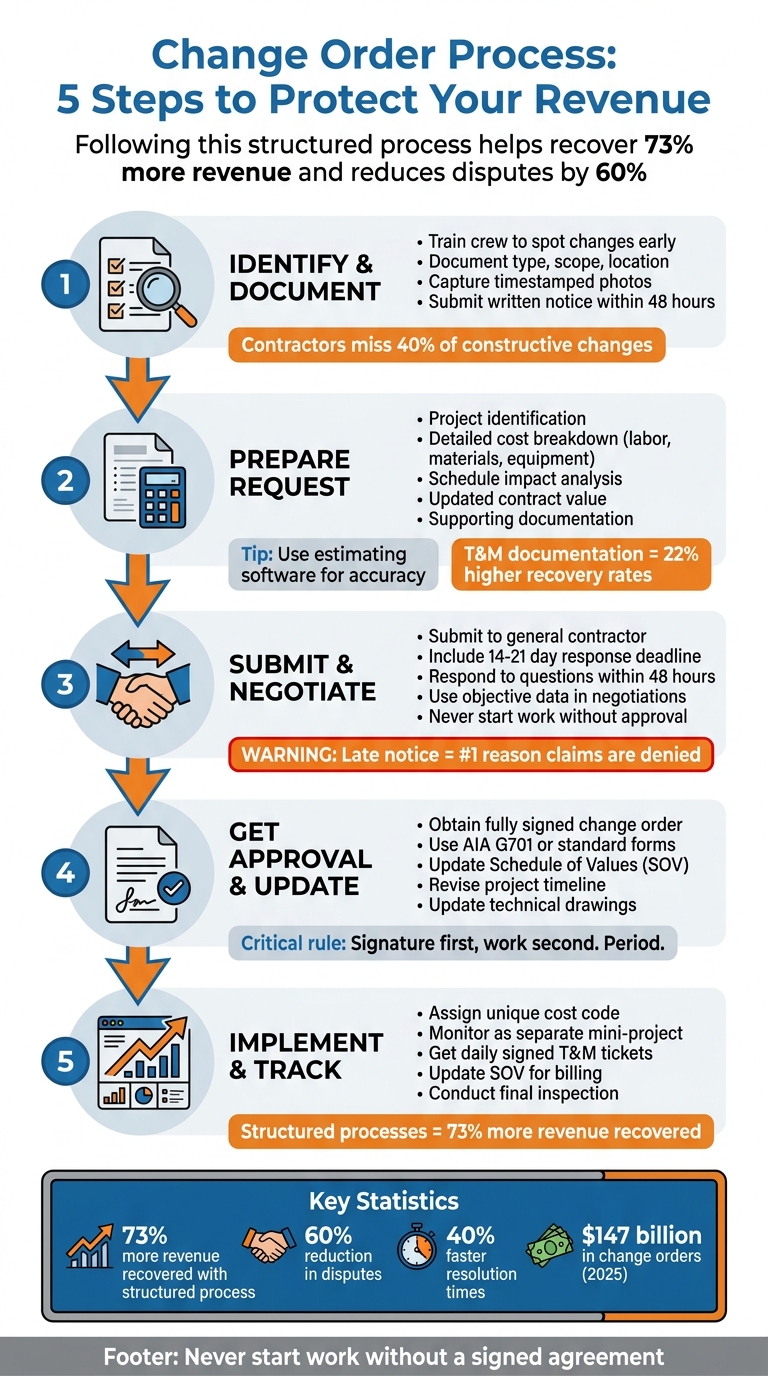
5-Step Change Order Process for Subcontractors
Step 1: Identify and Document the Change
Recognize the Change
The field crew plays a crucial role as the first line of defense in spotting changes on-site. It’s essential to train site leaders to quickly identify these changes. Be on the lookout for key triggers such as RFI responses that expand the project scope, Architect Supplemental Instructions (ASIs), design conflicts between trades (like MEP vs. structural), or unexpected demands from building inspectors that go beyond the original specifications.
Pay close attention to new drawing revisions that could impact fees or schedules. Also, keep an eye out for unforeseen conditions, such as subsurface issues or hidden elements, that differ significantly from the original contract. Constructive changes can be particularly challenging – they occur when an owner’s actions (or inactions) modify your contract without a formal directive. Examples include disputes over design interpretation, inspector overreach, or restricted site access.
Surprisingly, contractors miss identifying an estimated 40% of constructive changes, leading to lost revenue opportunities. Michael Torres from ConstructionBids.ai highlights the importance of early detection:
the field crew sees changes first, and their early identification drives timely notification.
When a change is identified, it’s vital to document it immediately, capturing all relevant details.
Document the Change
Start by recording the type, scope, and location of the change. Be specific about the materials, labor, and equipment involved. Include details on associated costs and specify any necessary schedule adjustments.
Support your documentation with solid evidence. Use timestamped photos of site conditions, field reports, RFI responses, and any related correspondence. Where applicable, reference specific drawings, specification sections, or contract clauses to strengthen your case.
Submitting written notice within 48 hours is critical to protecting your revenue. Even if your contract allows more time, acting promptly makes a significant difference. Contractors who notify within 48 hours recover 73% more revenue compared to those who delay. Michael Torres underscores this point:
written notice is the single most critical step in the change order process.
To ensure no detail is missed, leverage digital logging systems to capture scope adjustments as soon as they are identified. This proactive approach ensures the request is documented before any work begins, setting the stage for a precise and well-supported change order request in the next step.
sbb-itb-4ee4ad4
Step 2: Prepare the Change Order Request
Required Components of a Change Order Request
A well-prepared change order request includes seven key elements that help speed up the approval process. Start with project identification, which should feature the contract number, project name and address, and full contact details for the owner, general contractor, and your company. Follow this with a description of the change. Be specific – reference drawing numbers, specification sections, or RFI responses that led to the modification.
The cost breakdown is where precision matters most. Many subcontractors lose money by being vague, so itemize all direct costs, such as labor (with burdened wage rates), material quantities (with unit costs and delivery fees), and equipment rentals. Don’t forget to include indirect costs like overhead (typically 10–20%) and profit (around 5–10%), then apply the markup percentage specified in the contract (often 15%). Clearly define the schedule impact by detailing the number of days affected, explaining how the change alters the critical path, and providing an updated completion date.
You’ll also need to update the contract value. Include the original contract sum, the total of all previously approved changes, the amount of the current request, and the new overall total. Attach supporting documentation such as vendor quotes, material specifications, updated plan takeoffs, and timestamped photos to back up your request. Lastly, include space for dated signatures from all authorized parties to make the document legally binding.
Using precision software can streamline this process and ensure your estimates are accurate.
Use Software for Accurate Estimates
Construction estimating software is an invaluable tool for eliminating manual math errors in change order requests. Accurate estimates are crucial when multiple parties must approve a change. With software, any adjustments to a line item automatically recalculate totals for labor, materials, overhead, and profit while maintaining consistent markup percentages. Tools like ScopeTakeoff allow you to perform PDF plan takeoffs directly from updated drawings, ensuring precise measurements of quantities and better justification for material increases.
One major advantage of these platforms is real-time cost integration. Advanced systems sync your change order estimates with the project budget and schedule of values, giving you an instant view of how a change impacts profitability. Many platforms also connect to pricing databases like RS Means, offering up-to-date local rates for materials and labor productivity. For emergency or undefined work, mobile apps let you document Time and Materials (T&M) work in real time. By capturing labor hours and material receipts on-site, you can achieve recovery rates up to 22% higher than with lump-sum pricing. Additionally, the software generates professional, itemized PDF reports that include the original contract value, the cost of the change, and the new proposed total – making the approval process smoother for general contractors and owners.
Step 3: Submit and Negotiate the Change Order
How to Submit the Change Order
Once your change order request is ready, send it to your general contractor. They’ll pass it along to the owner and, if necessary, the architect. Make sure all relevant parties are included so the change is properly documented in the project’s master records.
To avoid delays, include a reasonable response deadline – typically 14 to 21 days. Attach your original contract to allow for a clear comparison of costs and scope differences. This level of transparency can help speed up the review process and reduce follow-up questions.
Construction expert Michael Torres emphasizes:
Written notice within contractual deadlines is the single most critical factor in change order recovery, as late notice is the top defense used to deny legitimate claims.
During the review, be quick to address any questions or requests for additional details – aim to respond within 48 hours to keep things moving.
Once submitted, be ready to discuss and negotiate the specifics to finalize the change.
Tips for Negotiating Changes
Negotiations often involve challenges around pricing, scope disagreements, or procedural concerns. The best way to navigate these conversations is by focusing on objective data – details from the prime contract, RS Means costs, timestamped photos, and logs can help keep the discussion grounded in facts.
It’s also important to approach negotiations with a balanced perspective. While you should be compensated for any extra work, it’s worth remembering that both the owner and general contractor are likely juggling budget and timeline pressures. Keeping a clear, concise record of all discussions, offers, and counteroffers can help avoid any confusion and ensure everyone is on the same page.
Never start work without written approval. Waiting for a signed change order or a formal Construction Change Directive ensures you maintain leverage. If pricing negotiations hit a snag, the owner might issue a Construction Change Directive, which requires you to proceed with the work while final pricing is still being determined. Avoid bringing up litigation during active negotiations – it can strain professional relationships without necessarily speeding up the process.
With thorough documentation and a professional approach to negotiation, you’ll be well-prepared to secure approval and update the contract.
Step 4: Get Approval and Update Contracts
Get Written Approval and Signatures
After successful negotiations, it’s time to secure formal written approval. Before starting any work, make sure you have a fully signed change order in hand. This not only protects your finances but also confirms that everyone agrees to the changes.
Use established forms like the AIA G701 to document all the essential details. Your change order should include the following:
- A unique change order number
- A detailed description of the scope of work
- A cost breakdown (covering labor, materials, and overhead)
- Any adjustments to the project schedule
Once the form is complete, submit it to your general contractor, who will coordinate signatures with the owner and architect. Typically, the approval process flows in this order: architect, contractor, and finally, the owner. To speed things up, consider using digital signature tools, which can help avoid delays. Also, track the change order status in your project management system to ensure it moves from "Pending" to "Approved" before moving forward.
Update Project Records
When all signatures are secured, the change order officially becomes part of the contract. Update your Schedule of Values (SOV) to include the new line items for accurate billing. Adjust the contract total by adding the original amount, previously approved changes, and the current adjustment. If the change order includes time extensions, revise your project timeline and completion dates accordingly. Don’t forget to update technical drawings and specifications to ensure your field team is working with the latest information.
Keep all signed change orders filed with your master contract, and maintain an organized, centralized change order log. Sharing an updated log with your general contractor every month can help everyone stay aligned on project totals. Tools like ScopeTakeoff’s SOV export feature can simplify this process by automatically formatting your Schedule of Values to match the original contract structure, minimizing errors in payment applications. Digital tools can also help you maintain an accurate log throughout the project.
With your records up to date, you’re ready to implement and monitor the approved changes.
Step 5: Implement and Track the Change
Begin Work Only After Approval
Never start work without a fully signed change order. A signed document is your legal assurance of payment. As one industry expert succinctly put it:
"Signature first, work second. Period. No handshake deals." – Projul
Jumping into work without proper approval puts you at risk of financial loss and weakens your negotiating position. If the change is urgent and can’t wait for pricing discussions, request a Construction Change Directive (CCD). This provides legal protection while allowing you to proceed immediately. Once you have formal approval, revise your schedule and budget, secure the necessary materials, assign labor, and brief your team on the new scope of work. During execution, keep a close eye on progress to ensure profitability.
Track Progress and Payments
Once the change order is approved and integrated into your project schedule, focus on managing and tracking its implementation. Assign a unique cost code to each approved change order. This allows you to monitor labor, materials, and equipment costs separately, treating each change as a mini-project with its own budget. Studies show that contractors using structured change order processes recover 73% more revenue compared to those with informal practices. This method not only reduces risk but significantly increases your chances of recovering costs.
For Time and Materials (T&M) work, make sure to obtain daily signed tickets from the owner’s representative. These tickets should confirm all hours worked and materials used. Support your documentation with date-stamped photos or videos to create a reliable audit trail. Update your Schedule of Values so the change order is reflected in your next pay application. Additionally, provide your general contractor with an updated change order log every month to keep project totals aligned. After completing the work, conduct a final inspection to confirm it meets quality standards and matches the revised drawings.
Construction Change Orders Explained: How to Document, Price, and Get Paid
Conclusion
This guide has walked you through the key steps to managing change orders effectively. At its core, success boils down to three essential practices: document everything, communicate immediately, and never start work without a signature. Subcontractors who stick to a structured process recover 73% more revenue on legitimate changes compared to those relying on informal agreements like handshake deals. Considering the industry handled an estimated $147 billion in change orders in 2025, the stakes are high.
Here’s how to apply these practices: the moment a change arises, document it within 48 hours. Create detailed requests that clearly outline scope adjustments, cost implications, and time impacts. Use standardized forms to ensure consistency. Submit the change order promptly, back up your negotiation with objective data, and always secure written approval before moving forward. Once approved, update your Schedule of Values (SOV) and closely monitor spending against the change order budget.
Thorough documentation is your best ally during negotiations. And here’s a golden rule: don’t start work without a signed agreement. This not only protects your payment rights but also minimizes liability risks.
Modern tools can take your process to the next level. Platforms like ScopeTakeoff simplify the workflow by automating pricing calculations, reducing spreadsheet errors, and syncing approved changes directly with your billing schedule. Features like PDF plan takeoff, automatic trade calculations, and SOV export help you create precise change order requests and avoid oversights during approval cycles.
Think of every change order as a mini-project with its own budget, timeline, and approval process. Contractors who adopt structured change management frameworks see a 60% reduction in disputes and resolve issues 40% faster. By combining disciplined processes with advanced tools, you can protect your margins and build stronger relationships with your clients.
FAQs
What counts as a constructive change?
A constructive change happens during the performance of a contract when a contractor is tasked with doing additional work – or sometimes even less work – without a formal change order in place. This essentially modifies the original scope of work, though it isn’t officially recorded as a directed change by the client or the government.
What if the GC tells me to proceed without a signed change order?
Proceeding with work without a signed change order can open the door to potential disputes over payment or project scope. To avoid these issues, always secure written confirmation outlining the scope changes and agreed payment terms before beginning any additional tasks. This step not only provides clear documentation but also safeguards your interests and minimizes the risk of future conflicts or legal complications.
How do I prove a change affected my schedule and costs?
To show how a change affected your schedule and costs, make sure to back it up with solid evidence. This could include photos, daily logs, and detailed records of any delays or extra expenses. It’s also essential to send written notice as soon as possible and within the time limits set by your contract – missing deadlines is a frequent reason claims get rejected. Keeping thorough documentation is key to proving your case and demonstrating how the change led to delays or higher costs.